

How to Use AI Agents to Automate Tasks?
AI agents are transforming the way we work by handling repetitive tasks such as emails, data entry, and customer support. They streamline workflows, improve accuracy, and free up time for more strategic work.
By Aakash Kumar · · 7 min read

AI agents are intelligent programs powered by AI and large language models that can understand instructions, make decisions, and perform tasks with little or no human input. They can automate repetitive workflows like scheduling, reporting, or customer support, saving time, reducing errors, and boosting efficiency for individuals and businesses.
What Exactly Is an AI Agent?
An AI agent is an intelligent program that can perceive its environment, make decisions, and take actions to achieve a specific goal.
Imagine you ask a virtual assistant to "plan a weekend trip to Goa." A simple chatbot might give you a list of flights. But an AI agent would take that goal and run with it: it could browse flight options, find hotels that match your budget, check the weather forecast, look up top-rated restaurants, and then present you with a complete, bookable itinerary. It works autonomously across multiple steps to get the job done.
This ability to independently plan and execute is what separates AI agents from the chatbots and simple automation tools we've used for years. As stated by NVIDIA CEO Jensen Huang at the company's 2024 developer conference, the "next generation of AI" is moving towards agents that can reason and plan complex actions.
How Do AI Agents Actually Work? A Simple Breakdown
At their core, most AI agents operate on a continuous loop that allows them to learn and act, often called the "Sense-Think-Act" cycle.
Sense: The agent gathers information from its digital environment. This could be data from a website, the contents of your inbox, or information from a specific application via an API.
Think: Using a large language model (LLM) or other AI models as its "brain," the agent processes this information. It breaks down your goal into smaller steps, evaluates different options, and creates a plan.
Act: The agent executes the plan by taking action. This could involve clicking a button on a website, sending an email, adding an event to your calendar, or purchasing an item online.
This loop repeats, with the agent sensing the results of its actions and adjusting its plan accordingly until the final goal is achieved.
AI Agents vs. Traditional Automation: What's the Difference?
You might be thinking, "I already use tools to automate my work. What's new?" The key difference lies in adaptability and autonomy.
Traditional automation, like tools from IFTTT or basic macros, follows strict, pre-programmed "if this, then that" rules. If anything unexpected happens, the automation breaks. AI agents are far more flexible.
Feature | Traditional Automation (e.g., a Macro) | AI Agent |
|---|---|---|
Logic | Rule-based (If X, do Y) | Goal-based (Achieve Z) |
Flexibility | Rigid, breaks on unexpected changes | Adaptive, can problem-solve |
Capability | Performs a single, predefined task | Executes complex, multi-step tasks |
Example | "If a new email arrives from my boss, star it." | "Find the top 3 cheapest flights to Delhi next weekend and email me a summary." |
This guide will focus on how to use AI agents to automate tasks in a way that goes far beyond simple rule-based systems.
What Kinds of Tasks Can You Automate with AI Agents?
The beauty of AI agents is their versatility. They can handle a wide range of tasks, from the mundane to the complex, across both your personal and professional life.
For Your Personal Life
Free up your mental space by delegating personal admin tasks to an agent.
Travel Planning: "Find a family-friendly resort in Bali for the first week of December under $200/night with a pool, and create a spreadsheet comparing the top 3 options."
Managing Finances: "Monitor my credit card statements for any subscriptions I haven't used in 3 months and list them for cancellation."
Shopping and Research: "Find the best deals online for a 65-inch 4K TV with at least 3 HDMI ports, summarize the user reviews, and send me the top 2 links."
Daily Scheduling: "Check my calendar and the weather forecast for tomorrow morning. If it's not raining, block out an hour for a run and move my first meeting back by 30 minutes."
For Your Professional Life
Boost your productivity by automating repetitive and time-consuming work tasks.
Email Management: "Go through my inbox, identify all emails related to 'Project Phoenix,' summarize their key action items, and create a draft response for each."
Lead Generation: "Scan LinkedIn for new marketing managers at tech companies in the UK with over 500 employees and add them to a leads list in Google Sheets."
Content Creation: "Research the top 10 trends in renewable energy for 2025, write a 500-word blog post outline on the topic, and find 3 royalty-free images to go with it."
Data Analysis & Reporting: "Analyze our weekly sales data from this spreadsheet, identify the top-performing product category, and generate a brief summary report with a chart."
How to Use AI Agents to Automate Tasks: A Step-by-Step Guide
Getting started with AI agents is more accessible than you might think. You don't need to be a programmer. Here’s a simple framework to follow.
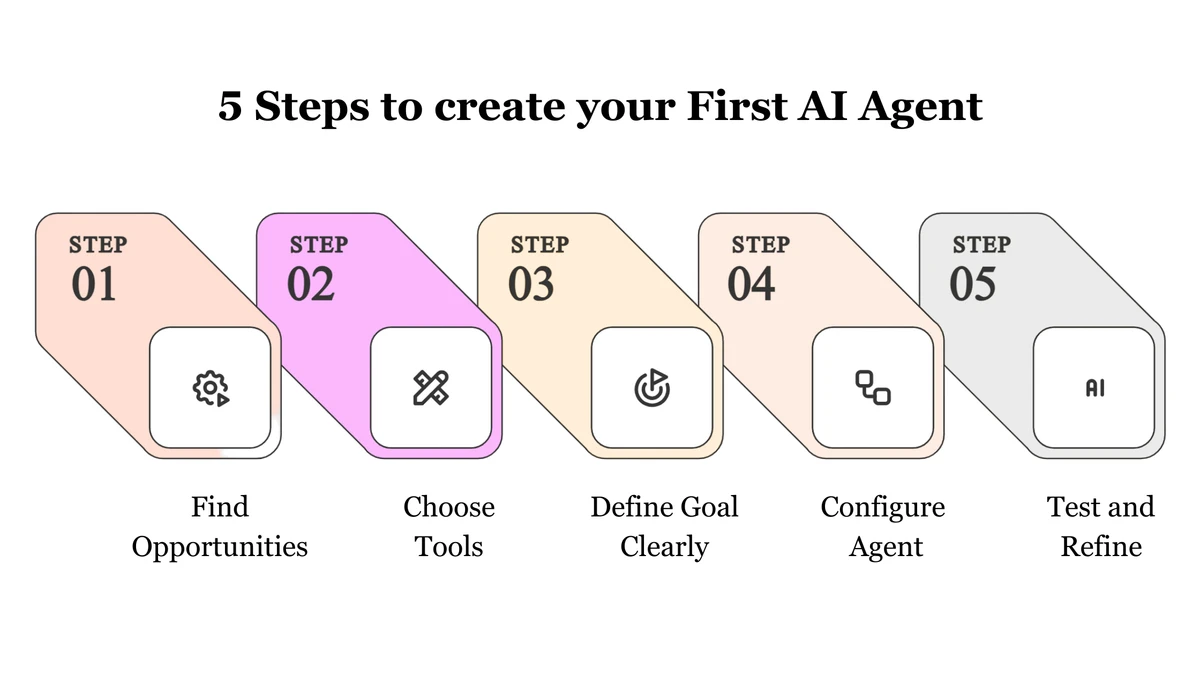
Step 1: Identify Your Automation Opportunities
First, pinpoint what you should automate. Look for tasks that are:
Repetitive: Things you do over and over again every day or week.
Time-Consuming: Tasks that take up a significant chunk of your time but don't require high-level strategic thinking.
Rule-Based (or Semi-Rule-Based): Processes that follow a predictable pattern.
Data-Driven: Tasks involving gathering, organizing, or summarizing information from different sources.
Action Tip: For one week, keep a "task log." Write down every task you do and how long it takes. At the end of the week, highlight the ones that fit the criteria above. These are your prime candidates for automation.
Step 2: Choose the Right AI Agent Tool
The market for AI agent tools is exploding. They generally fall into a few categories:
No-Code Automation Platforms: Tools like Zapier, Make.com, and n8n are integrating AI capabilities that allow you to build sophisticated, agent-like workflows without writing any code. You can connect different apps and inject AI-powered logic to make decisions.
Browser-Based Agents: These are often extensions or web platforms where you can give instructions in plain English, and the agent will carry out tasks by browsing the web for you. Early examples and open-source projects like AgentGPT and Auto-GPT showcase this concept.
Specialized Agents: These are tools designed for one specific, complex task. For example, Fireflies.ai is an agent that joins your meetings, transcribes them, and provides summaries. Durable can act as an agent to build an entire website for you in seconds.
For beginners, starting with a no-code automation platform that has AI features is often the easiest entry point.
Step 3: Define a Clear Goal and Constraints
This is the most crucial step. You need to tell your AI agent exactly what you want it to achieve. This is similar to "prompt engineering" for chatbots, but for actions.
A bad instruction is vague: "Find me a hotel." A good instruction is specific and includes constraints:
Goal: "Find and book a hotel in central London."
Dates: "From October 15th to October 18th."
Budget: "Maximum £150 per night."
Constraints: "Must have free Wi-Fi and be within a 10-minute walk of a Tube station. Do not book anything with a guest rating below 4.5 stars."
Final Action: "Present the top 3 options in an email before booking anything."
Step 4: Set Up and Configure Your Agent
This process will vary depending on the tool, but it generally involves:
Connecting Your Accounts: Granting the agent secure access to the apps it needs (e.g., your Google Calendar, email, Slack, etc.).
Building the Workflow: Using a visual editor or a text prompt to outline the steps the agent should take.
Providing the Goal: Inputting your specific, detailed instruction from Step 3.
Step 5: Test, Monitor, and Refine (Human in the Loop)
Never fully "set it and forget it" on your first try. Always run your agent in a test mode first.
Test: Give it a small, low-stakes task to see how it performs. Does it understand the instructions? Does it get stuck?
Monitor: Keep a close eye on the agent’s actions. Many tools provide logs so you can see what decisions it's making.
Refine: Based on its performance, tweak your instructions. Make them clearer, add more constraints, or simplify the goal. This "human-in-the-loop" approach is key to building a reliable and trustworthy AI agent.
What Are the Challenges and Risks to Consider?
While powerful, AI agents are not flawless. Being aware of the risks is crucial for using them responsibly.
Security and Privacy: You are granting these tools access to your data and accounts. It's essential to use reputable platforms with strong security policies and be mindful of what information you allow them to access.
Errors and "Hallucinations": AI models can make mistakes, misunderstand context, or "hallucinate" incorrect information. This is why human oversight is critical, especially for important tasks like booking travel or sending emails to clients.
Cost: While many tools offer free tiers, running complex agents can become expensive as they consume computing resources or require premium subscriptions.
Over-Automation: It can be tempting to automate everything, but some tasks benefit from a human touch. Strategic thinking, creative problem-solving, and building relationships are still firmly in the human domain.
Conclusion
AI agents represent a significant leap forward from simple automation. They are adaptable, goal-oriented partners that can take on complex, multi-step tasks, freeing up your most valuable resource: your time. By starting small, defining clear goals, and always keeping a human in the loop, you can begin to delegate the digital drudgery of your life and work.
This technology is no longer science fiction. It's a practical tool available today that can help you focus less on being busy and more on doing what truly matters.